Below you will find all the pages tagged with #Azure
Super-Mario at the Edge
In this blog post, I’m going to introduce you to AKS Edge Essentials (AKS EE), and show you how to run Super-Mario at the AKS EE cluster using Helm charts and GitOps.
Streaming and analysing air quality IoT data with Azure
Looking for a way to stream and analyse IoT data with Azure? Look no further, you’re in the correct place.
In this blog post, I’ll demonstrate how to stream and analyse IoT data with Azure for ten euros or so per month. I’ll start with introducing the architecture and it’s components. As I’m going to stream air quality measurement data, I’m also going to shortly introduce the sensor itself and the particulate matters it measures.
Having a first look of the Service Retirement workbook (preview)
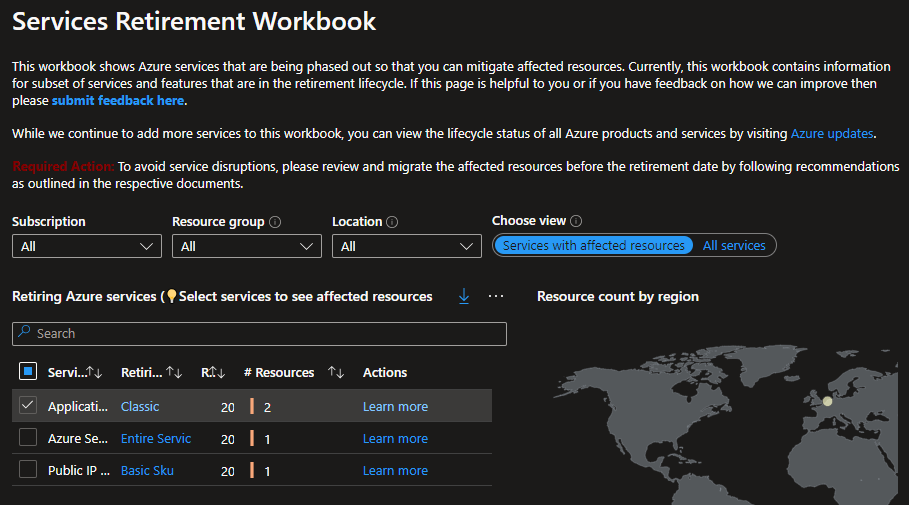
We all know how rapidly all public cloud providers like to introduce new features and services. At the same time some of the old stuff needs to go. It’s sometimes hard to keep up and follow all the communication channels to ensure you’re not running any services or features that are about to get the boot.
Exporting Azure Cost Management data

I assume we all acknowledge the importance of following your cloud spend. And although Azure Portal’s Cost Management and Billing is a great tool for monitoring, allocating and optimizing Azure costs, sometimes there are needs to export the underlying data to be used in another external tool. Or maybe just for archival reasons.
Spinning up and running Squid in Azure VM
Sometimes I need access to a proxy server, and in most cases the proxy should be located in a certain country or region. This is where all public cloud providers come in handy. In this blog article I’ll be spinning up and running Squid in Azure VM. Using Bicep template for automation to get rid of manual installation and configuration tasks.
Migrating Strongswan config from ipsec.conf to swanctl.conf
Remember one of my older blog post where I built a site-to-site vpn between Azure and my home office using Raspberry Pi? If you’ve been following me in social media, you would already know what happened a day later. My router broke. So it was really nice that I had a sort of checklist of what I needed to do on the router’s config.
How to add CA certificates into Data Explorer Kusto emulator docker image
Remember my previous blog post where I was spinning up Azure Data Explorer Kusto emulator in WSL? During the test I had problems ingesting data from https sources. Let’s see if we can fix that.
Let's give Azure Data Explorer Kusto emulator a spin in WSL
The Kusto emulator was released back in September 2022. Encapsulating the Kusto Query Engine and making it available on local compute in a Docker Container. Until June 2023 the emulator was only available as a Windows Container. Now that Microsoft have announced general availability of the Linux Kusto emulator, let’s give it a spin in WSL.
Building a Site-to-Site VPN to Azure using Raspberry Pi
There are times when I need to use or test something in Azure using a private and secure connection from my home office. This is where VPN connections come into the picture. I had an extra Raspberry Pi laying around and decided to use it as a vpn gateway for the site-to-site connection.
101 on AKS defaults, nodes, pods and stuff

I know this blog post is long overdue. No excuses. Been to busy lazy.
Thanks for being here, let’s start with 101 on AKS defaults, nodes, pods and stuff.
Set Up Kubernetes Cluster Playground With Azure Virtual Machines and CLI
I’m going to write some blog posts about my Kubernetes adventures, and the first thing I wanted to do, was to set up some scripts to build up a simple Kubernetes environment to play with. I will of course also play around with Azure Kubernetes Service (AKS), but I also want to run some experiments with control plane. This means I need to build my own cluster, as control plane in AKS is provided as a managed Azure service.
Custom 404 error page, Hugo and Azure Static Web Apps
In this blog post I will show you how to configure custom 404 error page, for a Hugo site hosted in Azure Static Web Apps. (In case you don’t know what 404 (Not Found) error is, it’s an HTTP status code which means that the page you were trying to reach on a website couldn’t be found on the server, altough the server itself is reachable.)
How to Use Staging in Azure Static Web Apps
TL;DR. Azure Static Web Apps Preview offers staging (pre-production) environments for applications.
What is a staging environment and why should I care?
Staging environment is a fully-functional staged version of your application. Imagine that you want to make a small change to a layout of the site. You change the css file and push the code into production. All done and well. What if you made a typo and broke the layout of the site? Maybe that’s not a big issue for a small site like this. Imagine doing this for a large site. Or, what if you made that small change to function call handling shopping cart and made it impossible to make purchases from your site.
We're Live and Kicking in Azure Static Web Apps
Actually I think that the title should include one more word, finally. Anyways, the site is live and kicking! And in this post I’ll briefly explain how we got here.